How to Replace a Serpentine Belt on a Xterra - DIY Guide
Replace the serpentine belt on a Nissan Xterra (2000-2015): OEM part numbers by engine, tensioner release and routing steps, plus pulley inspection tips.

One-tap dark, screen-awake, step-by-step reading for hands-on work.
How to Replace a Serpentine Belt on a Nissan Xterra (Step-by-Step Guide)
The serpentine belt is one of the most critical components in your Nissan Xterra's engine bay. This long, ribbed belt is the workhorse that powers essential accessories like your alternator, power steering pump, air conditioning compressor, and sometimes the water pump. Without it, your battery won't charge, steering will become incredibly difficult, and your engine could quickly overheat, leaving you stranded. Fortunately, replacing a worn-out serpentine belt is a straightforward DIY job that most home mechanics can tackle with basic tools, saving you a significant amount on labor costs.
Hearing a high-pitched squeal on a cold morning, or a persistent chirping sound from under the hood? These are classic signs that your serpentine belt is crying for help. Over time, the rubber hardens, cracks, and stretches, losing its ability to grip the pulleys effectively. Ignoring these warnings can lead to the belt snapping, causing an immediate loss of power to all its driven components.
This comprehensive guide will walk you through every step of a Nissan Xterra serpentine belt replacement. We'll cover all engine types, from the first-generation 2.4L and 3.3L models to the second-generation 4.0L V6, ensuring you have the correct part numbers, tool list, and know-how to get the job done right.
When to Replace Your Xterra's Serpentine Belt
Proactive maintenance is key to avoiding a roadside breakdown. A serpentine belt doesn't have a fixed failure point, but there are clear guidelines and warning signs that indicate it's time for a replacement.
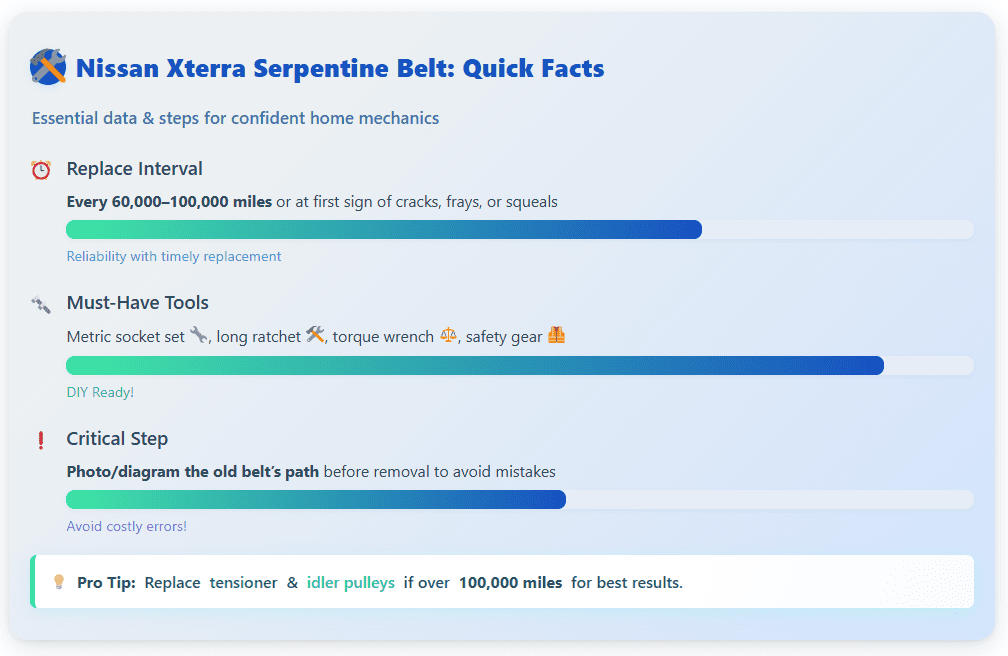
You should plan to inspect your belt during regular oil changes and aim for a replacement based on mileage or visible wear. Nissan generally recommends replacement every 60,000 to 100,000 miles, but harsh climates or strenuous driving can shorten this lifespan. Look for these tell-tale signs of a failing belt:
- Cracking or Glazing: Look for multiple cracks in the ribbed side of the belt. A shiny, glazed surface indicates the rubber has hardened and will slip.
- Fraying: The edges of the belt should be clean. Any fraying or separated fibers mean the belt is deteriorating.
- Squealing or Chirping Noises: A loud squeal upon startup or during acceleration is the most common symptom of a loose or worn belt.
- Accessory Malfunctions: If your power steering feels heavy intermittently or your battery light flickers, it could be due to a slipping belt failing to properly turn the alternator or power steering pump.
Get the most out of your Nissan Xterra with our step-by-step DIY Maintenance Guide for Nissan Xterra (2000-2015) - everything you need to know in one comprehensive article.
Essential Tools and Materials
Before you pop the hood, gathering the right tools will make this job much smoother. While there are some engine-specific needs, the core toolkit is fairly standard for any Xterra model.
You don't need a professional garage, but a few key items are non-negotiable. The most important tool is a long-handled ratchet or breaker bar to get the necessary leverage on the belt tensioner.
- Ratchet and Metric Socket Set: A 3/8" or 1/2" drive ratchet with a set of metric sockets (10mm, 12mm, 14mm, 15mm will be most common).
- Long-Handled Ratchet or Breaker Bar: Essential for rotating the spring-loaded tensioner. A dedicated serpentine belt tool kit is highly recommended and often includes slim-profile crowfoot wrenches for tight spaces.
- Combination Wrenches: A metric set for any bolts in tight areas.
- Flat-Head Screwdriver: Useful for prying off plastic engine covers or splash shields.
- Safety Gear: Always wear safety glasses and mechanic's gloves.
- Torque Wrench: Crucial if you decide to replace the tensioner or idler pulleys.
- Flashlight or Headlamp: Good lighting is key to seeing the belt routing and pulley condition.
Finding the Right Serpentine Belt for Your Xterra
Using the wrong belt is a recipe for disaster. A belt that's too long won't have proper tension, while one that's too short won't fit at all. Always verify the part number for your specific Xterra engine.
You can choose between an OEM (Original Equipment Manufacturer) part from Nissan or a high-quality aftermarket belt. Reputable aftermarket brands like Gates, Dayco, or Bando are excellent alternatives that often meet or exceed OEM specifications. Below are the OEM part numbers to guide your search.
First-Generation Xterra (2000–2004)
- 2.4L 4-Cylinder (KA24DE): The correct OEM part is Nissan 11720-7B410. This is a shorter belt, approximately 35 inches (887mm) long.
- 3.3L V6 (VG33E / VG33ER): Both the naturally aspirated and supercharged 3.3L V6 engines use the same primary serpentine belt, Nissan part 11720-4S100. This belt is around 49 inches long.
Supercharger Note: The supercharged 3.3L V6 (VG33ER) has a second, separate belt just for the supercharger (Nissan PN 11920-5S700). The procedure in this guide covers the main accessory belt, not the supercharger belt.
Second-Generation Xterra (2005–2015)
- 4.0L V6 (VQ40DE): All second-gen Xterras with the 4.0L V6 use Nissan part 11720-EA200, which was later updated to 11720-EA20A. This is a 7-rib belt approximately 88 inches (2217mm) long. A common high-quality aftermarket equivalent is the Gates K070873.
A Note on Aftermarket Belts
When buying an aftermarket belt, always cross-reference the part number with your vehicle's year, model, and engine size. The part number itself often contains the belt's specifications. For example, a Gates 7PK2217 indicates it has 7 Poly-V K-ribs and is 2217mm in length.
Nissan Xterra Serpentine Belt Replacement: Step-by-Step Instructions
With your new belt and tools ready, it's time to get to work. This process is similar across all Xterra engines, with the main difference being the location of the tensioner and the belt's routing path.
Follow these steps carefully for a successful replacement. Remember, safety first - never work on a hot engine.
- Preparation and Safety First
Park your Xterra on a level surface and engage the parking brake. Allow the engine to cool down completely. For safety, disconnect the negative terminal of the battery. If you need more room to work from below, safely jack up the front of the vehicle and secure it with jack stands. Remove any plastic engine covers or splash shields that block access to the front of the engine. - Locate and Diagram the Belt Routing
Before you remove anything, take a clear photo or sketch the path of the old belt. This is the most critical step to prevent confusion later. The belt weaves around the crankshaft pulley (at the bottom), the alternator, the power steering pump, the A/C compressor, and the tensioner and idler pulleys. An incorrect routing will cause accessories to spin backward or not at all. - Release the Belt Tension
Locate the automatic belt tensioner. It's an arm with a pulley on the end that is spring-loaded to keep the belt tight. You will need to rotate this arm to release the tension.- For 1st-Gen (2.4L/3.3L) models: The tensioner often has a 14mm hex head bolt or a 3/8" square recess.
- For 2nd-Gen (4.0L) models: The tensioner typically has a 14mm hex head for you to put a socket on. Some may have a 1/2" square hole.
Fit your breaker bar or long-handled ratchet onto the tensioner and rotate it (usually clockwise) to loosen the belt. You will feel the spring's resistance.
- Remove the Old Belt
While holding the tensioner back with one hand, use your other hand to slip the old belt off one of the smooth, non-grooved pulleys, like an idler or the water pump pulley. Once it's free, slowly release the tensioner back to its resting position and remove the old belt from the engine bay entirely. - Inspect Pulleys and Components
With the belt off, now is the perfect time to check the condition of every pulley. Spin each one by hand (alternator, power steering, idlers, etc.). They should spin smoothly and silently. If you feel any roughness, grinding, or hear any noise, the bearing in that pulley is failing and should be replaced. Also, check the tensioner itself. It should pivot smoothly and provide strong resistance. - Install the New Serpentine Belt
Consult your photo or diagram and begin routing the new belt around the pulleys. Make sure the ribbed side of the belt sits inside the grooved pulleys. It's often easiest to loop the belt around all pulleys except for one easily accessible, smooth pulley. - Apply Tension and Verify Alignment
With the belt mostly in place, rotate the tensioner again with your breaker bar. Carefully slip the final section of the belt over the last pulley. Once it's on, slowly release the tensioner, ensuring it swings back to apply firm pressure to the belt. Do a final visual check to confirm the belt is seated correctly in the center of every single pulley groove. - Final Checks
Re-install any engine covers or splash shields you removed. Reconnect the negative battery terminal. Start your Xterra and let it run for a minute. Listen for any unusual noises and watch the belt to ensure it's tracking straight. Turn the steering wheel and switch the A/C on and off to confirm all accessories are working properly.
Tips & Tricks for a Smooth Replacement
- Double-Check Belt Routing and Orientation: This is the most common mistake. The ribbed side of the belt must contact grooved pulleys, and the smooth back side must contact smooth pulleys. An incorrect path can damage the new belt or your accessories.
- Replace While You're In There: The tensioner and idler pulleys have bearings that wear out over time. If your Xterra has over 100,000 miles, it's smart and cost-effective to replace the tensioner assembly and any idler pulleys at the same time as the belt. This prevents you from having to do the same job again in a few months when a pulley fails.
- The Supercharger Secret (VG33ER): Remember, if you have the supercharged 3.3L V6, replacing the main serpentine belt does not affect the smaller belt driving the supercharger. That is a separate belt and a separate job.
- Listen for Post-Installation Noises: If you hear a squeak or chirp after installing the new belt, shut off the engine immediately. The most likely cause is a misaligned belt that isn't sitting correctly in one of the pulley grooves.
FAQ
Q: How often should I replace the serpentine belt on my Nissan Xterra?
- A: Nissan generally recommends replacing the serpentine belt every 60,000 to 100,000 miles. Inspect it during regular oil changes and look for cracking, glazing, fraying, or squealing noises as signs it needs replacement.
Q: What tools do I need to replace the serpentine belt on a Nissan Xterra?
- A: Basic tools include a ratchet and metric socket set, long-handled ratchet or breaker bar, combination wrenches, flat-head screwdriver, safety glasses, mechanic’s gloves, torque wrench, and good lighting such as a flashlight or headlamp.
Q: What are the OEM part numbers for Nissan Xterra serpentine belts by generation?
- A: First-generation (2000–2004) 2.4L: 11720-7B410; 3.3L: 11720-4S100 (supercharger belt: 11920-5S700). Second-generation (2005–2015) 4.0L: 11720-EA200 or updated 11720-EA20A.
Q: What is the most important step before removing the old belt?
- A: Take a clear photo or make a diagram of the old belt’s routing path around the pulleys. This ensures correct installation of the new belt and avoids confusion.
Q: Should I inspect other parts while replacing the serpentine belt?
- A: Yes, spin each pulley by hand to check for smooth operation and listen for noise. Replace worn tensioners or idler pulleys, especially if the vehicle is over 100,000 miles.
Q: What can cause squealing noises after replacing the serpentine belt?
- A: Squealing or chirping sounds after installation usually indicate a misaligned belt or that it’s not seated correctly on a pulley. Shut off the engine immediately and realign the belt if this occurs.
Conclusion - The Serpentine belt replacement
Replacing the serpentine belt on your Nissan Xterra is a rewarding and manageable DIY project that builds confidence and saves money. By following the steps outlined in this guide, you can ensure your vehicle's essential systems remain powered and reliable for tens of thousands of miles to come. The key to success lies in careful preparation: getting the right parts, taking note of the belt's path, and inspecting related components while you have everything apart.
Don't wait for a high-pitched squeal to turn into a snapped belt and a costly tow. Take a look under your hood this weekend. If you see cracks, fraying, or other signs of wear, you now have the knowledge to tackle the job yourself. With a new belt installed, you can hit the road - or the trail - with the peace of mind that your Xterra is running in top condition.