How to Replace the Alternator and Battery on a Xterra (DIY)
Replace the alternator and battery on a Nissan Xterra (2000-2015): OEM part numbers by engine, battery group sizes, torque specs, and a charging test.

One-tap dark, screen-awake, step-by-step reading for hands-on work.
How to Replace the Alternator and Battery on a Nissan Xterra (Complete Guide)
The charging system is the heart of your vehicle's electrical network, and for a rugged SUV like the Nissan Xterra, a reliable alternator and battery are non-negotiable. Whether you're miles from the nearest road or just commuting to work, a failing charging system can leave you stranded without warning. Symptoms like dimming headlights, a slow-cranking engine, or a persistent battery light on your dash are all cries for help from under the hood.
Tackling a Nissan Xterra alternator and battery replacement yourself is a rewarding project that can save you a significant amount of money and give you a deeper understanding of your vehicle. This guide is designed for the confident DIYer, providing a comprehensive walkthrough for both 1st Generation (2000–2004) and 2nd Generation (2005–2015) models. We'll cover everything from identifying the right parts and tools to step-by-step removal and installation procedures, complete with engine-specific tips.
Ready to restore your Xterra's electrical health and get back on the road with confidence? Let's dive in and get our hands dirty. This guide will ensure you have all the information you need to do the job right the first time.
Recognizing a Failing Alternator or Battery
Before you start turning wrenches, it's crucial to correctly diagnose the problem. The symptoms of a bad alternator and a failing battery can often overlap, so understanding the key differences will ensure you're replacing the right component.
Common Symptoms of Alternator Failure
A failing alternator won't properly recharge your battery or power your vehicle's electronics while the engine is running. Look out for these signs:
- Dimming or Flickering Lights: Your headlights and interior dash lights may flicker, dim, or get brighter as you rev the engine.
- Warning Light: The most obvious sign is a battery icon, "ALT," or "GEN" light illuminating on your dashboard.
- Strange Noises: A grinding or whining noise coming from the front of the engine could indicate failing bearings inside the alternator.
- Electrical Issues: Accessories like your radio, power windows, or heated seats may work erratically or not at all.
- A Dead Battery: While a battery can die on its own, an alternator that isn't charging will quickly drain even a brand-new battery.
Telltale Signs of a Bad Battery
A vehicle's battery has a finite lifespan, typically 3-5 years. If your battery is old, it may simply not be able to hold a charge anymore.
- Slow Engine Crank: When you turn the key, the engine turns over sluggishly before starting.
- No-Start Condition: You hear a clicking noise, but the engine won't crank at all.
- Swollen or Leaking Case: If the battery case looks bloated or is leaking fluid, it's a clear sign of internal failure and needs immediate replacement.
- Corrosion: Heavy, fuzzy buildup on the battery terminals can impede the flow of electricity.
Essential Tools and Materials for the Job
Gathering all your tools and parts before you begin is the key to a smooth and efficient repair. While some tools are universal, certain engine models may require specific socket sizes. Having everything within arm's reach prevents unnecessary trips to the auto parts store.
General Tools
- Metric Socket Set (⅜” and ½” drive)
- Metric Combination Wrench Set (8mm - 17mm)
- Ratchets and Extensions
- Breaker Bar (for stubborn bolts)
- Serpentine Belt Tool or a long 14mm-15mm wrench
- Torque Wrench
- Screwdriver Set (Phillips and flathead)
- Pliers (needle-nose and standard)
- Jack and Jack Stands or Vehicle Ramps
- Safety Glasses and Gloves
- Digital Multimeter
Specialized Items and Consumables
- Pry Bar: Can be useful for gently repositioning the alternator or relieving belt tension.
- Battery Terminal Cleaner: A wire brush specifically designed for cleaning posts and clamps.
- Anti-Corrosion Spray or Dielectric Grease: To protect terminals after installation.
- Memory Saver (Optional but Recommended): Plugs into your OBD-II port to preserve your vehicle's radio presets and ECU settings while the battery is disconnected.
Finding the Right Parts: Xterra Alternator and Battery Specifications
Using the correct alternator and battery is critical for proper function and fitment. The Nissan Xterra saw significant changes between its first and second generations, especially regarding the engine and its accessories. Always verify your part numbers against your vehicle's specific year and engine.
Nissan Xterra Alternator Part Numbers by Generation
The alternator you need depends entirely on your Xterra's engine. The 4.0L V6 in later models, for instance, uses a higher-output unit compared to the earlier engines.
| Generation | Engine | OEM Part Number(s) | Notes |
|---|---|---|---|
| 1st Gen (2000-2004) | 2.4L I4 (KA24DE) | 23100-3S500, 23100-3S501 | Remanufactured part is 23100-3S500R. |
| 1st Gen (2000-2004) | 3.3L V6 (VG33E & VG33ER) | 23100-4S100 | Same alternator for both naturally aspirated and supercharged models. |
| 2nd Gen (2005-2006) | 4.0L V6 (VQ40DE) | 23100-EA201 | Remanufactured part is 23100-EA201R. |
| 2nd Gen (2007-2015) | 4.0L V6 (VQ40DE) | 23100-ZH00D | This is a 110A high-output unit that replaced earlier versions. |
If you are serious about getting a high-output alternator, make sure to read our post: Best High‑Output Alternator for Nissan Xterra (Winch, Lights, Overlanding)
Nissan Xterra Battery Size and CCA Requirements
The battery tray and required group size also changed over the Xterra's production run. Using the correct group size ensures the battery fits securely in its tray and the terminals align properly.
| Generation / Years | Battery Group Size(s) | Recommended CCA | Notes |
|---|---|---|---|
| 1st Gen (2000–2004) | Group 24 | 500-600+ CCA | A standard and widely available size. |
| 2nd Gen (2005–2009) | Group 24F or Group 34R | 600-700+ CCA | The "F" and "R" denote reversed terminal post positions. Check your original battery. |
| 2nd Gen (2010–2015) | Group 35 | 650-750+ CCA | This smaller size is often paired with AGM batteries for better off-road durability. |
CCA (Cold Cranking Amps) is a measure of a battery's ability to start an engine in cold weather. Always choose a battery that meets or exceeds the OEM recommendation, especially if you live in a cold climate or run electrical accessories like winches or off-road lights.
Need help with Xterra maintenance schedules and procedures? Our detailed DIY Maintenance Guide for Nissan Xterra (2000-2015) covers all the essentials.
The Complete Nissan Xterra Alternator and Battery Replacement Guide
With your parts and tools ready, it's time to perform the replacement. This step-by-step process is broken down into logical phases. Work patiently, keep your bolts organized, and always prioritize safety.
Step 1: Vehicle Prep and Safety Precautions
- Park Safely: Park your Xterra on a flat, level surface and engage the parking brake. Chock the wheels for extra security.
- Disconnect the Battery: Open the hood. Using a 10mm wrench, always disconnect the negative (-) battery terminal first. This prevents accidental short circuits. Secure the cable away from the battery post. Then, disconnect the positive (+) terminal.
- Gain Access: Remove any plastic engine covers or air intake ducting that obstructs your view and access to the alternator.
Step 2: Serpentine Belt Removal
- Locate the Tensioner: Find the automatic serpentine belt tensioner. It's a spring-loaded pulley designed to keep the belt tight. It will have a 14mm or 15mm bolt head or square drive hole on it.
- Release Tension: Using a long wrench or a serpentine belt tool, rotate the tensioner to release the tension on the belt.
- Remove the Belt: While holding the tension, carefully slip the serpentine belt off the alternator pulley. You don't need to remove the belt completely, just move it out of the way. If you're unsure of the routing, take a quick photo or sketch it down.
Step 3: Xterra Alternator Removal (Engine-Specific Tips)
- Disconnect Electrical Connectors: Unplug the main electrical harness connector from the back of the alternator. Then, remove the rubber boot from the main power stud (the B+ terminal) and use a socket to remove the nut holding the positive battery cable.
- Remove Mounting Bolts: An alternator is typically held on by a long pivot bolt at the bottom or top and a shorter bracket or adjuster bolt. Loosen and remove these bolts. Be prepared to support the weight of the alternator as you remove the last bolt.
- Maneuver the Alternator Out: Carefully lift and maneuver the old alternator out of the engine bay.
Pro Tip for 4.0L VQ40DE Engines: Accessing the alternator on the 2nd Gen Xterra can be tight. Many DIYers find it much easier to remove the passenger-side front wheel and the plastic wheel well liner. This provides direct, unobstructed access to the alternator from the side, often eliminating the need to work around radiator hoses from above.
Step 4: Installing the New Alternator
- Compare Old and New: Before installing, hold the new alternator next to the old one. Ensure the mounting holes, pulley, and electrical connections are identical.
- Position the New Unit: Carefully place the new alternator into its mounting bracket.
- Install Bolts: Loosely thread in the pivot and bracket bolts by hand to avoid cross-threading. Do not tighten them fully yet.
- Reinstall the Belt: Rotate the tensioner again and slip the serpentine belt back over the alternator pulley. Double-check that the belt is correctly seated on all pulleys in the system.
- Torque the Bolts: Now, tighten the alternator mounting bolts to the correct torque specification (see table below).
- Reconnect Wires: Reattach the main positive cable to the alternator's B+ stud and tighten its nut. Plug the electrical harness connector back in. Place the rubber boot back over the B+ terminal.
Step 5: Xterra Battery Replacement
- Remove the Old Battery: With the terminals already disconnected, use a 10mm wrench or socket to remove the nuts on the battery hold-down clamp. Lift the clamp off and carefully lift the old battery out of the tray. Be warned, batteries are heavy!
- Clean the Tray and Terminals: Clean any corrosion from the battery tray and cable clamps using a wire brush or terminal cleaner. This is a critical step for ensuring a good connection.
- Install the New Battery: Place the new battery securely in the tray, ensuring the positive and negative posts are oriented correctly.
- Secure the Battery: Reinstall the hold-down clamp and tighten it until the battery is snug. Do not overtighten, as this can crack the battery case.
- Reconnect Terminals: Reconnect the positive (+) terminal first, followed by the negative (-) terminal. Tighten the terminal nuts until they are secure. Wiggle them to ensure they don't move.
Final Checks and System Testing
You're almost done! The final step is to verify that your work was successful and the charging system is operating correctly. Never skip this part, as it can catch potential issues before they become major problems.
How to Test Your New Alternator and Battery
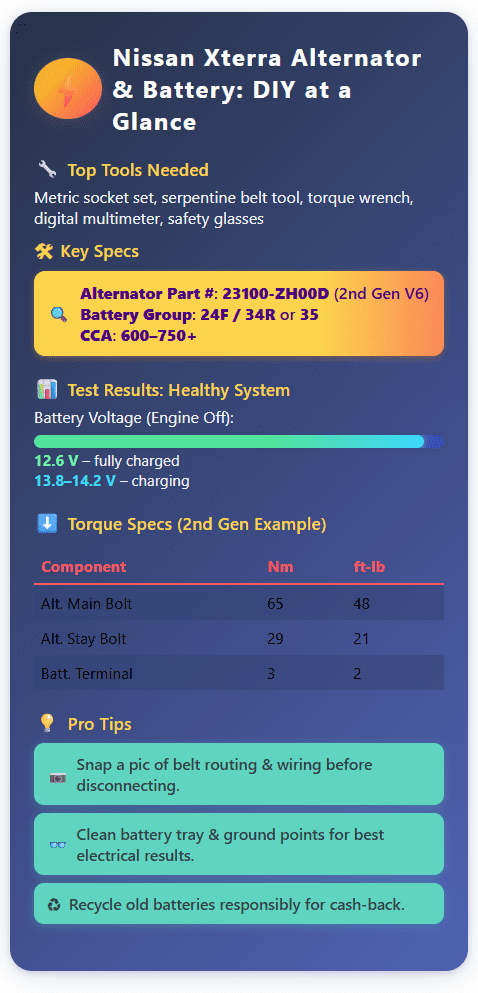
- Static Voltage Check: Before starting the engine, set your digital multimeter to DC volts. Place the red probe on the positive battery post and the black probe on the negative post. A fully charged new battery should read approximately 12.6 volts.
- Charging System Check: Clear all tools from the engine bay and start your Xterra. With the engine idling, measure the voltage across the battery terminals again. A healthy alternator should be putting out ~13.8 to 14.2 volts. This confirms it is actively charging the battery.
- Load Test: With the engine still running, turn on heavy electrical loads like the headlights, A/C, and interior fan on high. The voltage should remain steady, staying above ~13.0 volts. If it drops significantly, there may be an issue with the new alternator.
- Final Inspection: Turn off the engine. Check for any warning lights on the dash and listen for any unusual noises.
Understanding Torque Specifications
Properly tightening bolts is crucial for safety and function. Over-tightening can strip threads or damage components, while under-tightening can lead to parts coming loose. Use a torque wrench for accuracy.
| Component | Engine | Torque Value (Nm) | Torque Value (ft-lb) |
|---|---|---|---|
| Alternator Pivot Bolt | 2.4L (KA24DE) | ~59 Nm | ~44 ft-lb |
| Alternator Bracket Bolt | 2.4L (KA24DE) | ~44 Nm | ~32 ft-lb |
| Alternator Bolts | 3.3L (VG33E/ER) | 22–29 Nm | 16–21 ft-lb |
| Alternator Main Bolt | 4.0L (VQ40DE) | ~65 Nm | ~48 ft-lb |
| Alternator Stay Bolts | 4.0L (VQ40DE) | ~29 Nm | ~21 ft-lb |
| Battery Terminal Nuts | All | ~3 Nm | ~2 ft-lb |
| Battery Hold-Down | All | 3–5 Nm | 2–4 ft-lb |
Tips & Tricks for a Smooth Job
Here are a few extra pieces of advice from experienced mechanics to make your Nissan Xterra alternator replacement even easier and more professional.
- Photograph Everything Beforehand. Before you disconnect a single wire or remove the serpentine belt, take a few clear photos with your phone. This creates a visual reference for belt routing and electrical connections, which can be a lifesaver during reassembly.
- Clean Your Grounds. While the battery is out, take a moment to locate, remove, and clean the main chassis and engine ground connections. A corroded ground can cause all sorts of mysterious electrical problems that mimic a failing alternator. A quick scrub with a wire brush can dramatically improve electrical performance.
- Use a Memory Saver. If you want to avoid the hassle of resetting your radio stations and clock, use an OBD-II memory saver. This simple device provides low-power voltage to the vehicle's computer systems while the main battery is disconnected, preserving all your settings.
- Recycle Your Old Battery. Car batteries are hazardous waste and should never be thrown in the trash. The auto parts store where you buy your new battery will almost always take your old one for free recycling, and they may even give you a small credit (core charge) for it.
FAQ
Q1: How do I know if my Nissan Xterra alternator is failing?
A: Common signs of alternator failure include dimming or flickering lights, a battery or “ALT” warning icon on the dash, strange grinding or whining noises from the engine bay, erratic electrical accessory operation, and a battery that keeps dying despite being new.
Q2: What battery group size and CCA should I use for my Nissan Xterra?
A: For 1st Gen (2000–2004) Xterra, use Group 24 batteries (500–600+ CCA). 2nd Gen (2005–2009) models use Group 24F or 34R (600–700+ CCA), and 2nd Gen (2010–2015) use Group 35 (650–750+ CCA). Always match or exceed the recommended CCA for your climate and accessories.
Q3: What tools are essential for replacing the alternator or battery?
A: Key tools include a metric socket set, combination wrenches (8–17mm), serpentine belt tool, torque wrench, screwdrivers, pliers, jack and stands, safety glasses, gloves, and a digital multimeter.
Q4: What are the torque specs for alternator and battery bolts on a Nissan Xterra?
A: For the 2nd Gen V6: Alternator main bolt ~65 Nm (48 ft-lb), alternator stay bolts ~29 Nm (21 ft-lb), battery terminal nuts ~3 Nm (2 ft-lb), battery hold-down 3–5 Nm (2–4 ft-lb). Always check specifics for your year/engine.
Q5: How do I test if my alternator and battery were installed correctly?
A: Check battery voltage before starting (~12.6V for new), then start the engine—voltage should read 13.8–14.2V. Under electrical load, voltage should remain above 13.0V. Listen for noises and check for warning lights after installation.
Q6: What are some expert tips for smooth DIY alternator or battery replacement?
A: Photograph wiring and belt routing before starting, clean ground terminals, use a memory saver for electronics, and recycle your old battery for environmental safety (and possible credits).
Conclusion - alternator and battery replacement
Congratulations! By following this guide, you've successfully completed a Nissan Xterra alternator and battery replacement. This is a significant DIY repair that not only saves you money but also empowers you with the skills and confidence to handle future maintenance. You've restored the reliability of your Xterra's charging system, ensuring it's ready for your next daily drive or off-road adventure.
Remember the key takeaways from this project: always diagnose the problem accurately, use the correct parts for your specific model, and prioritize safety at every step. Taking the time to clean connections and torque bolts to spec will ensure your repair lasts for years to come. Now that your electrical system is in top shape, you can drive with the peace of mind that comes from a job well done.
With this project under your belt, consider what's next for your Xterra. A simple inspection of your serpentine belt, spark plugs, or fluid levels can go a long way in preventing future issues. Keep up the great work, and enjoy the ride.