Xterra Headlight Upgrade Guide: Brighter, Safer, Better
Nissan Xterra headlight upgrade guide: correct bulb sizes by generation (9004/9007), reflector-safe LEDs, projector retrofits, drop-ins, and aiming steps.

Nissan Xterra Headlight Upgrade Guide: Brighter, Safer, Better
The Nissan Xterra is a legendary, rugged SUV built for adventure. However, if you've ever driven one at night, especially an older model, you're likely familiar with its one major weakness: dim, yellowish, and frankly outdated factory headlights. Trying to spot obstacles on a dark trail or simply navigate a poorly lit highway with stock halogen bulbs can be a nerve-wracking experience. This isn't just an inconvenience; it's a significant safety issue.
Fortunately, a Nissan Xterra headlight upgrade is one of the most impactful and rewarding modifications you can perform. Modern lighting technology can transform your nighttime visibility, making driving safer, reducing eye strain, and giving your truck a sharp, updated look. From simple plug-and-play LED bulbs to full-blown projector retrofits, there's a solution for every budget and skill level.
This comprehensive guide will walk you through everything you need to know. We'll cover the specific bulb sizes for every Xterra generation, break down the four main upgrade paths, and provide essential tips on installation, aiming, and staying street legal. Get ready to leave those dim factory lights in the past and unlock your Xterra's true nighttime potential.
Know Your Xterra: Headlight Bulb Sizes by Generation (2000-2015)
Before you buy any new parts, the first and most critical step is to identify the correct headlight bulb size for your specific vehicle. Nissan used different bulbs and housings for the first and second-generation Xterras, and getting this wrong means your new lights simply won't fit. It's also important to note that no Xterra ever came from the factory with projector or HID headlights - they all use standard reflector housings.
First Generation Xterra (2000–2004) Bulb Specs
The first-gen Xterra uses a single dual-filament bulb to handle both low and high beams in one unit. If your truck is equipped with factory fog lights, they use a separate, smaller halogen bulb.
- Headlight Bulb (Low & High Beam): 9004 (also known as HB1 or H13)
- Fog Light Bulb (if equipped): H3 (some late models may use an H3C variant)
Second Generation Xterra (2005–2015) Bulb Specs
The second-gen Xterra also uses a single dual-filament bulb for the main headlights, but the specific type is different from the earlier models. The fog light bulb was also updated to a more modern and common size.
- Headlight Bulb (Low & High Beam): 9007 (also known as HB5)
- Fog Light Bulb (if equipped): H11
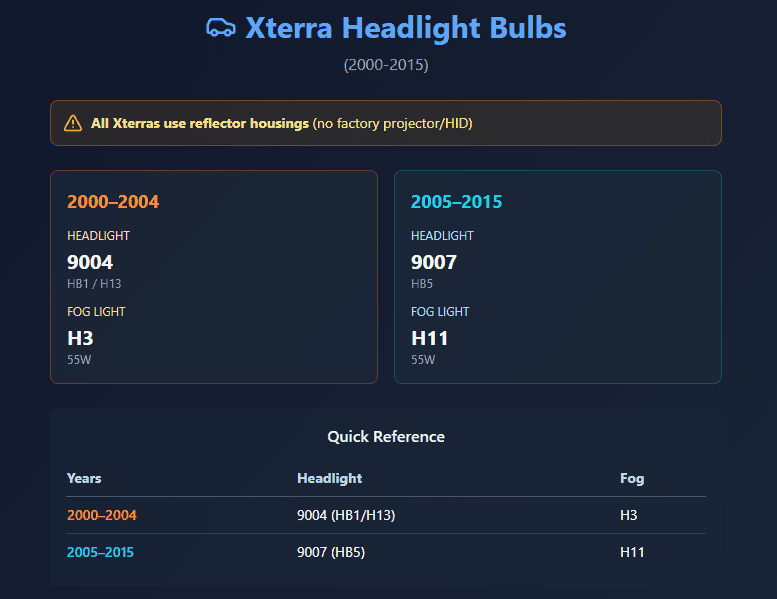
| Model Year | Low/High Beam Bulb | Fog Light Bulb |
|---|---|---|
| 2000–2004 | 9004 / HB1 / H13 | H3 (55W) |
| 2005–2015 | 9007 / HB5 | H11 (55W) |
Tier 1: Premium LED Bulbs (The Best Plug-and-Play Upgrade)
For most Xterra owners, upgrading to high-quality LED bulbs is the fastest and most effective way to improve night vision. This approach offers a massive leap in brightness and a modern, crisp white light with minimal installation effort. However, because the Xterra uses reflector housings, it is absolutely crucial to choose LEDs specifically designed to mimic the light pattern of a halogen filament.
Why "Reflector-Safe" LEDs are Essential
A standard reflector housing is a chrome bowl designed to capture light from a tiny halogen filament and focus it down the road. If you install a poorly designed LED bulb with chips that don't replicate this filament location, the reflector will scatter light everywhere. This creates immense, blinding glare for oncoming drivers and can actually reduce your effective visibility by failing to create a focused beam. Look for LED bulbs from reputable brands like Philips, Hikari, or Sylvania that explicitly advertise a halogen-mimicking beam pattern for safe use in reflector housings.
Top LED Bulb Recommendations for Your Xterra
When shopping for the best LED headlights for Xterra, focus on quality brands that deliver on their promises of performance and reliability.
- Key Features to Look For:
- Adjustable Clocking: Allows you to rotate the bulb in the housing to achieve the perfect beam pattern.
- Effective Cooling: A fan or a large passive heat sink is necessary to keep the LED chips from overheating and failing prematurely.
- Color Temperature: A 6000K-6500K rating provides a pure, cool white light without being overly blue.
- CANbus Compatibility: Many modern LED kits have built-in drivers to prevent "bulb out" warnings or flickering, though older Xterras are less sensitive to this.
Tier 2: Projector Retrofit Kits (The Ultimate Performance Mod)
If you're seeking the absolute best light output and a razor-sharp beam pattern, an Xterra projector retrofit is the ultimate solution. This advanced modification involves surgically opening your factory headlight housings and installing high-performance Bi-Xenon or Bi-LED projector units. While it requires significant DIY skill and a higher budget, the results are unparalleled.
What is a Projector Retrofit?
A projector uses a lens, a reflector bowl, and a cutoff shield to control and focus light with extreme precision. This creates a perfectly flat beam pattern with a distinct "cutoff" line, putting all the light on the road where you need it and none of it in the eyes of other drivers. A Bi-Xenon or Bi-LED projector uses an internal shield that moves to switch between low and high beams, providing incredible brightness for both functions from a single projector.
Benefits of a True Projector Setup
- Unmatched Light Intensity: Delivers the highest possible concentration of light on the road surface.
- Zero Glare: The sharp cutoff line completely prevents blinding oncoming traffic.
- Professional Appearance: Gives your Xterra a high-end, modern look.
Kits from brands like Morimoto are the gold standard in the retrofitting community. This is a complex weekend project, but for the serious lighting enthusiast, the performance gains are well worth the effort.
Tier 3: Complete Replacement Headlight Assemblies
For those who want the look and performance of projectors without the hassle of a full retrofit, complete replacement headlight assemblies are an excellent middle ground. These are all-in-one, "drop-in" units that replace your entire factory headlight. Many aftermarket options from brands like Autozensation, Anzo, or Morimoto come with projector lenses and integrated LED or HID systems pre-installed.
The Easiest Path to Projector Performance
This is a true plug-and-play solution. You simply unbolt your old, faded factory headlights and install the new assemblies using the original mounting points and electrical connectors. You get the benefit of a modern projector beam pattern and a fresh, clear lens that instantly updates the look of your Xterra's front end. While more expensive than a simple bulb swap, they are often cheaper and far less labor-intensive than a full DIY retrofit.
Tier 4: The Budget-Friendly Halogen Boost
If you're on a tight budget, don't despair. You can still achieve a noticeable improvement in visibility without breaking the bank. By combining two simple and affordable upgrades, you can squeeze the maximum possible performance out of your Xterra's stock halogen setup.
High-Output Halogen Bulbs
The first step is to replace your standard halogen bulbs with a high-performance set. Bulbs like the Philips X-tremeVision or Sylvania SilverStar Ultra are engineered to be significantly brighter (up to 130-150% more light) and cast a whiter light than their stock counterparts. This is a direct, 5-minute swap that makes an immediate difference.
The Critical Wiring Harness Upgrade
The real secret to maximizing halogen performance is to install a dedicated relay harness. Your Xterra's factory headlight wiring is old and thin, causing voltage drop before the power even reaches the bulbs. A relay harness connects directly to your battery and uses the factory headlight switch only as a trigger. This ensures your new high-output bulbs receive full battery voltage, allowing them to shine at their absolute brightest and last longer. For 2002-2004 Xterras, Nissan even made an OEM plug-in relay module (Part No. 28575-7Z410) to solve flicker issues with higher-draw bulbs.
Legal, Safety, and Aiming: The Must-Do Final Steps
Installing brighter lights is only half the battle. To ensure your upgrade is both safe and effective, you must address legal compliance and, most importantly, properly aim your new headlights. Skipping this step can render your expensive upgrade useless and create a serious hazard for other drivers.
Staying Street Legal: DOT Compliance and Color
Always choose lighting products that are marked as DOT/SAE compliant, which certifies they meet federal standards for on-road use. Pay attention to color temperature, measured in Kelvin (K). A range of 3000K to 6000K is ideal.
- ~3200K: Standard halogen yellow/warm white.
- 4300K-5000K: Neutral white, often considered the best for all-weather visibility.
- 6000K: A popular cool white with a hint of blue, providing a modern look.
- Above 6500K: Becomes increasingly blue and is often illegal, while also performing poorly in rain, fog, and snow.
For fog lights, a 3000K amber/yellow color is highly effective as it cuts through inclement weather with less glare than white light.
Crucial Safety Warning: No matter what upgrade you choose, you must aim your headlights correctly. Properly aimed lights put the brightness on the road, while poorly aimed lights blind other drivers and fail to illuminate the path ahead.
How to Properly Aim Your Xterra Headlights
Proper headlight aiming for a Nissan Xterra is simple and takes just a few minutes. All you need is a level surface, a wall, and a Phillips head screwdriver.
- Park your Xterra on level ground, exactly 25 feet from a flat, vertical wall.
- Measure the distance from the ground to the center of each headlight lens. Place a piece of horizontal tape on the wall at this exact height for each headlight.
- Turn on your low beams. The top of the brightest part of the beam pattern should be right at or slightly below the tape line.
- Locate the adjustment screws on the back of the headlight housing. The Xterra typically has one on the side for horizontal (left/right) aim and one under a plastic cap on top for vertical (up/down) aim.
- Turn the screws to adjust each beam until it is perfectly aligned. The goal is to have the most intense part of the beam just below the horizontal tape line and centered vertically.
Tips & Tricks for a Flawless Installation
- Restore Your Lenses First: If your headlight lenses are yellowed or hazy, no bulb will be effective. Use a headlight restoration kit (like those from 3M or Turtle Wax) to polish them back to crystal clarity before you install new bulbs. Be sure to apply a UV sealant afterward to prevent them from yellowing again.
- Use Dielectric Grease: Apply a small dab of dielectric grease to all electrical connectors, including the bulb socket and any new harness plugs. This prevents corrosion by sealing out moisture, ensuring a reliable connection for years to come.
- Handle Halogen Bulbs with Care: If you are installing new halogen bulbs, never touch the glass with your bare hands. The oils from your skin can create hot spots on the bulb, causing it to fail prematurely. Use clean gloves or a paper towel to handle them.
- Secure Your Wiring: If your LED bulbs have external drivers or you've installed a relay harness, take the time to neatly route the wires away from hot engine components or moving parts. Use zip ties to secure everything for a clean, professional, and safe installation.
FAQ - Xterra Headlights
- Q: What are the correct headlight bulb sizes for the Nissan Xterra (all years)?
A: 2000–2004 Xterra uses a 9004/HB1/H13 bulb; 2005–2015 uses a 9007/HB5 bulb. Fog light bulbs: H3 (2000–2004) and H11 (2005–2015). - Q: What is the easiest way to upgrade Xterra headlights for better brightness?
A: Installing reflector-safe premium LED bulbs is a fast, plug-and-play upgrade that dramatically increases brightness and provides modern white light. - Q: Why are “reflector-safe” LEDs important in an Xterra’s stock headlight housing?
A: Only reflector-safe LEDs mimic the correct filament position, ensuring a focused beam pattern and avoiding dangerous glare for other drivers. - Q: What is a projector retrofit, and why consider it for the Xterra?
A: A projector retrofit adds true projector lenses inside the housing for a precise, ultra-bright beam - eliminating glare and massively improving visibility. - Q: Can I install complete aftermarket headlight assemblies for my Xterra?
A: Yes, drop-in LED or projector headlight assemblies from brands like Morimoto or Anzo offer improved performance without complicated retrofits. - Q: What’s the best budget-friendly way to upgrade Xterra headlights?
A: Using high-output halogen bulbs plus a dedicated headlight relay harness boosts brightness and reliability without breaking the bank. - Q: How do I make sure my headlight upgrades are legal?
A: Use DOT/SAE-compliant bulbs or assemblies. For color temperature, a 3000K–6000K white light range is safest and legal for road use. - Q: Why is headlight aiming important, and how is it done on the Xterra?
A: Proper aiming ensures brightness hits the road, not other drivers. Park 25 feet from a wall; adjust so top of beam sits just under headlight-center tape line. - Q: Should I do anything before installing new bulbs?
A: Restore foggy or yellowed lenses first - no bulb upgrade is effective through a hazy lens. Use a restoration kit and apply UV sealant. - Q: Are there any installation tips to ensure long-lasting headlight upgrades?
A: Use dielectric grease on connectors, handle bulbs with gloves, and secure wires away from heat - these prevent failures and extend component life.
Conclusion
Upgrading the headlights on your Nissan Xterra is a game-changer for nighttime driving. Gone are the days of squinting to see the road ahead. Whether you opt for a simple and effective LED bulb swap, a budget-friendly halogen boost, or a high-performance projector retrofit, you are making a direct investment in your safety and confidence behind the wheel. The difference is truly night and day.
Remember to start by identifying the correct bulb size for your generation (9004 for 2000-2004, 9007 for 2005-2015). From there, choose the upgrade path that best fits your budget and technical comfort level. Most importantly, do not skip the final, critical step of aiming your new headlights. This single action ensures your newfound brightness illuminates the road ahead without endangering others.
Now, it's time to take action. Evaluate your options, select the right products for your needs, and get ready to enjoy a completely transformed night driving experience in your capable and now brightly-lit Nissan Xterra.